

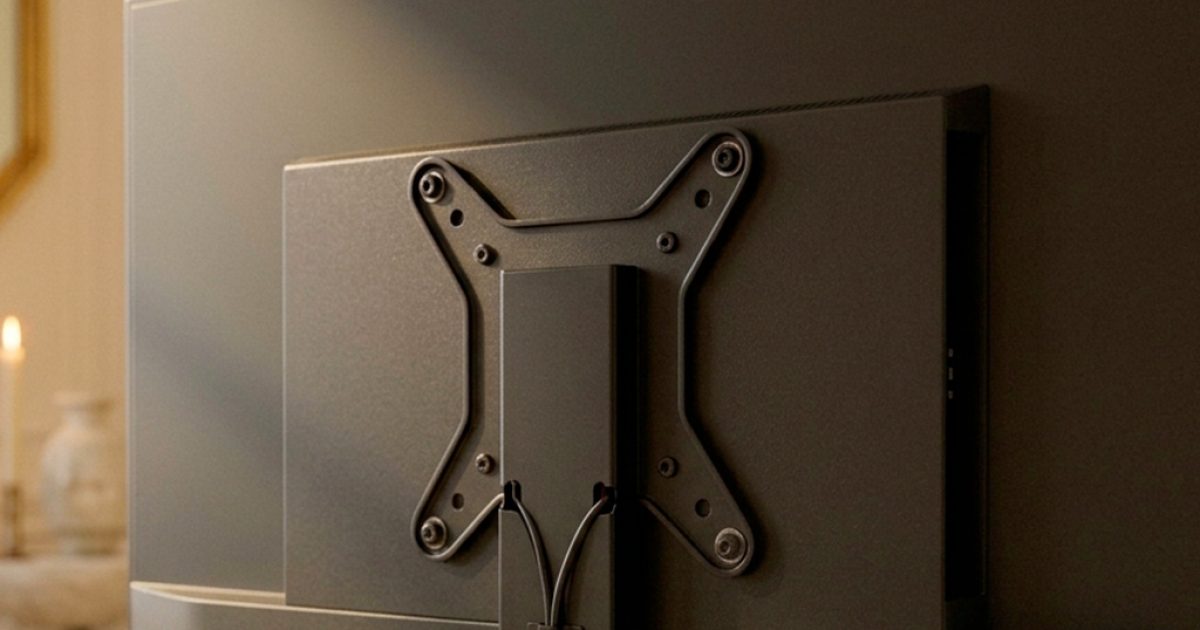

Every Harmony Beds TV bed holds your television with a VESA mount. It’s the same standard wall brackets use, so most modern flat-screen TVs will fit. This quick guide explains what VESA means, how to check your TV, and which TV support to choose when you order.
What does VESA mean?
VESA is the Video Electronics Standards Association, the industry body that set a universal pattern for attaching flat screens to brackets and stands. A TV that is “VESA compatible” has four threaded screw holes on the back, laid out in a square or rectangle. Any VESA bracket with the matching pattern can bolt straight on.
How to check your TV in 30 seconds
- Look at the back of the screen. You’re looking for four screw holes (sometimes with plastic plugs or screws already in them) in a square or rectangle, usually near the middle.
- Check the manual or spec sheet. Search the model number online with “VESA”. You’ll see a figure such as 100 x 100, 200 x 200, 300 x 300 or 400 x 400.
- Read the numbers. The VESA figure is the distance between the holes in millimetres: horizontal first, then vertical. 200 x 200 means the holes are 200mm apart each way.
If your TV has no screw holes on the back, or only fits its own pedestal stand, it isn’t VESA compatible and can’t be fitted to a TV bed lift.
Which TV support should I choose?
When you order a TV bed, you’ll pick the support that matches your screen size:
- Standard Support (28–42 inches): included in the price.
- Oversize Support (43–65 inches): a £120 upgrade for larger screens, including 43-inch TVs.
Screen size is measured diagonally, corner to corner, and is listed in your TV’s model details.
Not sure? Ask us before you order
Send us your TV’s make and model number and we’ll confirm it fits the lift before your bed is built. It takes a minute and saves any surprises on delivery day.